Can I Run Leonida? PC Requirements Checker
Check if your PC can run Leonida, the community GTA 6 recompilation project. Compare your GPU, CPU and RAM against the Xbox Series X baseline in seconds.
Pick your parts for an instant, unofficial estimate against the Xbox Series X baseline this project targets. 72 GPUs and 61 CPUs, desktop and laptop, plus the system and disk facts the project documents. Everything runs in your browser — nothing is uploaded.
Start typing a model name and pick from the list. Keyboard: ↑ ↓ to move, Enter to select. Note: Windows Explorer labels GiB as "GB" — 400 GiB is roughly 430 GB in decimal units.
Pick a GPU, a CPU and your RAM first.
Hardware compatibility
| GPU | |
|---|---|
| CPU | |
| RAM |
Build readiness
Build facts from the project README, checked November 24, 2026.
Unofficial hardware-class estimate, not measured performance. The project is early and does not boot yet, so requirements may change. This site provides no game files and no downloads.
Leonida is the name of a community project that tries to run the Xbox Series version of GTA 6 natively on Windows. It is not a Rockstar product, and as of late November 2026 there is still no official PC version of GTA 6. People search "can I run Leonida" because they want to know whether their hardware is in the same class as the console the project is built around.
This page answers that question with a rough hardware estimate, and it also reports what the project documents about actually building the thing. Type your graphics card and processor into the search boxes, choose your RAM, then set your operating system, build plan and free disk. The verdict updates as you go, and nothing you select leaves your browser. The project facts on this page were last checked on November 24, 2026.
What a result looks like
Here is a real run of the checker. Inputs: an RTX 4060 Laptop, a Core i7-12700H and 16 GB of RAM. Output: Borderline, with a GPU score of 85 and a CPU score of 110 against the Series X baseline of 100.
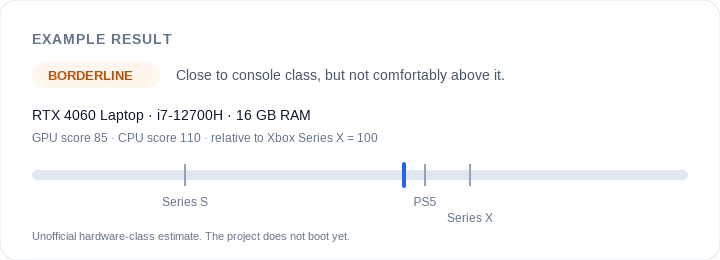
The laptop GPU is the weak part. 85 is below console class, so a port would lean on it, while the CPU at 110 is fine. That is the shape of the hardware answer: a class comparison that names the part dragging the score, not a frame rate prediction.
What this checker does
The tool compares your parts with the Xbox Series X, the console whose version of the game the project is recompiling. It gives you one of three answers: a good match, borderline, or unlikely. Under the verdict you get a short explanation for each part, so you can see whether the GPU, the CPU or the memory is holding you back.
The library covers 46 desktop GPUs, 26 laptop GPUs, 25 desktop CPUs and 36 mobile CPUs. Laptop parts carry scores that already account for their lower sustained power limits, so an RTX 4060 Laptop sits below an RTX 4060 desktop even though the names look similar.
The build block below the hardware verdict uses the project's own notes rather than estimates: the documented Windows path, about 400 GiB free for a full build or about 30 GB for the run-only stages, and the required Xbox Series copy, version 1.0.2.1.
The hardware estimate is honest about what it is. Public spec sheets can tell you that one GPU has more compute units than another. They cannot tell you how a half-finished recompilation will behave on your driver version, because nobody has run the game yet.
How to use it
- Start typing your GPU model in the first box, for example 4060 or 6800, and pick the exact entry from the list. Task Manager has the model name under Performance, GPU; dxdiag shows it on the Display tab.
- Do the same for your CPU. The same Performance tab lists it under CPU, including core and thread counts.
- Choose your RAM, your operating system, a build plan and your free disk. The verdict appears as soon as everything is set, and the button still works if you prefer it.
The search matches any part of a model name, so a short string is usually enough. Keyboard works too: arrow keys move through the list, Enter selects, Escape closes it. If your exact model is missing, pick the closest part one step below it. A desktop card with a similar name to a laptop card can be a full tier faster.
What Leonida is
GTA 6 launched on November 19, 2026 for PlayStation 5 and Xbox Series X/S. Its PC release has not happened, and press reports point to early 2027. Until then, a community project named Leonida tries to run the Xbox build natively on Windows by recompiling it: the console's x86-64 code executes on your CPU, its RDNA2 GPU programs are translated to Vulkan, and game data comes from your own copy of the Xbox package, version 1.0.2.1. The project is early, its own documentation says the game does not boot, and the original repository went offline on November 24, 2026, with community continuations carrying the source. What is Leonida explains the project and the state of the official PC release in full.
Why the Series X is the baseline
Because the project targets console code, the Xbox Series X is the fairest yardstick. It combines an 8-core, 16-thread Zen 2 CPU with an RDNA2 GPU of 52 compute units (about 12 teraflops) and 16 GB of shared GDDR6 memory. The PS5 is close to that class. The Series S is roughly a third of the GPU and should be treated as the floor, not the target.
Our index sets the Series X at 100. A GPU scoring 110 or more is ahead of console class, 75 to 109 is borderline, and below 75 is a hard sell. CPUs use the same scale, with a Ryzen 5 3600 style part (6 cores, 12 threads) treated as console class for scheduling purposes.
How the estimate works
Each GPU in the list carries a relative raster performance index and a VRAM figure. Each CPU carries a relative throughput index. The checker takes the weaker of your two indices, then adjusts for memory: 8 GB of system RAM costs you 45 points, 16 GB is neutral, 32 GB and 64 GB add a few. VRAM below 8 GB costs 12 points, and integrated graphics are flagged outright.
Those adjustments produce the three tiers. They are deliberately blunt. A relative index built from public specs cannot capture driver behavior, shader compilation, or how a specific engine uses a specific architecture. What it can do is tell you whether you are in the right hardware class before you spend hours reading a GitHub issue thread.
Limits worth knowing
The project does not boot, so no frame rate claim is possible, ours or anyone else's. No official RAM or VRAM minimum has been published either; the tiers here are estimates from the console's memory budget. Requirements can change overnight as the port evolves. Vulkan support is mandatory; a card without a working Vulkan driver is out regardless of its benchmark score. The shader translator expects 64-wide wave operations, which AMD GPUs provide natively; on NVIDIA and Intel the project may need the LEONIDA_W64_EMULATE=1 workaround, and that costs performance. Laptop scores are estimates of sustained performance, not short benchmark peaks. And the original repository is offline, so the code you find today may not be the code the requirements were written for.
Related guides
- Leonida build status tracks what works and what does not, dated.
- Leonida GitHub explains why the original repository is offline and which continuations carry the source.
- How to build Leonida lists the prerequisites, the stages and the disk space.
- Leonida PC requirements lists what the project states and what we estimate.
- What is Leonida explains the fictional state, the project, and the missing PC release.
- Is Leonida safe covers the fake repository problem and what this site does not host.
Bottom line
If your PC is at or above Series X class, with 16 GB of RAM and a Vulkan GPU with 8 GB or more of VRAM, your hardware is not the reason you cannot play Leonida today. The build is. Keep the checker bookmarked for the day the project boots, and run it again whenever you change a part.
Frequently asked questions
Can I run Leonida on my PC right now?
You can get a hardware estimate and a build-readiness check here, but nobody can play Leonida yet. The project is early and its own documentation says the game does not boot. The checker tells you whether your parts are in console class, not whether a playable build exists.
What do I need to build it?
Your own Xbox Series copy of the game, version 1.0.2.1, plus about 400 GiB (roughly 430 GB in decimal units) of free disk for a full build or about 30 GB for the run-only stages. Windows 10/11 x64 is the documented path; Linux runs under Wine or Proton with setup work, and macOS is not a supported target (Wine/CrossOver only, with known gaps).
Is there an official RAM or VRAM minimum?
No. No RAM or VRAM minimum has been published, and no frame rate table exists because the game does not boot. The 16 GB RAM floor and 8 GB VRAM line on this page are our estimates from the console's memory budget.
Does the checker include laptop parts?
Yes. The lists include 26 laptop GPUs and 36 mobile CPUs, with scores that already factor in sustained mobile power limits. Search the exact model of your laptop chip instead of picking a desktop card with a similar name.
What are the Leonida PC requirements?
The project states Windows 10 or 11 (64-bit), a Vulkan-capable GPU from AMD, NVIDIA or Intel, your own Xbox game package, and about 400 GiB free for a full build. Our estimate adds 16 GB of RAM and at least 8 GB of VRAM as the practical floor.
Is Leonida the same as GTA 6 on PC?
No. Leonida is an unofficial community recompilation project, not a Rockstar release. GTA 6 launched on November 19, 2026 for PS5 and Xbox Series X/S, and the official PC version has not been released; press reports point to early 2027.
Do I need to own GTA 6 to run Leonida?
According to the project's documentation, the build reads models, textures and audio from your own copy of the Xbox game package, version 1.0.2.1. Without that package there is nothing for the recompiled code to load.
Why does the checker ask for my GPU, CPU and RAM?
Those three parts decide whether your machine is in the same performance class as the Xbox Series X the project targets. The comparison runs entirely in your browser, and nothing is uploaded or stored.
Will an NVIDIA or Intel GPU work?
The project's shader translator has been tested on NVIDIA Turing, Ampere, Ada and Blackwell, plus Intel Gen9 hardware. However, it relies on 64-wide wave operations that AMD GPUs provide natively, so NVIDIA and Intel may need the LEONIDA_W64_EMULATE=1 workaround, which costs performance.
Is it safe to download Leonida from other sites?
Be careful. The original repository went offline in November 2026 and many lookalike repositories appeared quickly, so we cannot vouch for any rebuild. This site hosts no files and links to no binaries. Read our safety page before you run anything.